Showing posts with label official. Show all posts
Showing posts with label official. Show all posts
Sunday, January 8, 2017
Official Facebook Recommendations Bar Widget for Blogger Blogspot
Official Facebook Recommendations Bar Widget for Blogger Blogspot
Facebook Introduced their brand new social social plugin called Facebook Recommendations Bar. It is Beta Plugins.
In this tutorial, we go to learn how to install Facebook Recommendations Bar in Blogger Blogs. This widget is more helpful to drive traffic from Facebook with and instant likes and related posts.
Preview
Official Facebook Recommendations Bar Widget Preview
OR
You can take a look at Right Bottom of this Page and see it’s action in Live!
How to Install the Official Facebook Recommendations Bar Widget?
In order to work the Facebook Recommendations Bar every blog should must have the Facebook Open Graphs meta tags.
I found the simplest and Working Facebook Open Graphs tags on GitHub gist. Thanks to pathawks.!
Add the Following code after <head> tag.
<!-- Begin Open Graph metadata -->
<b:if cond=data:blog.pageType == "item">
<meta content=article property=og:type/>
<meta expr_content=data:blog.title property=og:site_name/>
<meta expr_content=data:blog.pageName property=og:title/>
<b:if cond=data:blog.postImageThumbnailUrl>
<meta expr_content=data:blog.postImageThumbnailUrl property=og:image/>
</b:if>
<b:else/>
<meta expr_content=data:blog.title property=og:title/>
<meta content=website property=og:type/>
</b:if>
<meta expr_content="en_US" property=og:locale/>
<meta expr_content=data:blog.canonicalUrl property=og:url/>
<!-- End Open Graph metadata -->
First Go to Facebook Recommendations Bar Official Page.
Directly click the Get Code Button.
Official Facebook Recommendations Bar Widget for Blogger / Blogspot step one
Click on Create a new app Link
Official Facebook Recommendations Bar Widget for Blogger / Blogspot step two
Enter the App Name with your Blog Title and App URL with your Blog URL, like as below and Click Continue button.
Official Facebook Recommendations Bar Widget for Blogger / Blogspot step three
Enter Captcha Code Correctly and Click Submit button
Official Facebook Recommendations Bar Widget for Blogger / Blogspot step four
Then Click the Get Code Button once again.
Official Facebook Recommendations Bar Widget for Blogger / Blogspot step five
Copy the First JavaScript SDK code (First Box Code) and Encode the Code using This Tool
Official Facebook Recommendations Bar Widget for Blogger / Blogspot step six
Login to New Blogger Dashboard > Choose your Blog and Click the More Options Dropdown
Select the Template > Click on Edit HTML > Proceed
Check/Tick the Expand Template Widgets checkbox
Search for <body> tag and place the Copied code After <body> tag.
Facebook Recommendations Bar Customizations:
You can customize the Facebook Recommendations Bar settings
Settings
Position:
Action
Trigger
Read Time
Number of Recomednations
Search for <data:post.body/> tag and place the following code after the <data:post.body/> tag
<b:if cond=data:blog.pageType == "item"><div class="fb-recommendations-bar" data-trigger="onvisible" expr:data-href="data:post.url" data-read-time="30" data-action="like" data-side="right" expr:data-site="data:blog.homepageUrl" data-num-recommendations="2"></div></b:if>
Save the Template, Enjoy :)
Please dorp your comments and share this post.
In this tutorial, we go to learn how to install Facebook Recommendations Bar in Blogger Blogs. This widget is more helpful to drive traffic from Facebook with and instant likes and related posts.
Preview
Official Facebook Recommendations Bar Widget Preview
OR
You can take a look at Right Bottom of this Page and see it’s action in Live!
How to Install the Official Facebook Recommendations Bar Widget?
In order to work the Facebook Recommendations Bar every blog should must have the Facebook Open Graphs meta tags.
I found the simplest and Working Facebook Open Graphs tags on GitHub gist. Thanks to pathawks.!
Add the Following code after <head> tag.
<!-- Begin Open Graph metadata -->
<b:if cond=data:blog.pageType == "item">
<meta content=article property=og:type/>
<meta expr_content=data:blog.title property=og:site_name/>
<meta expr_content=data:blog.pageName property=og:title/>
<b:if cond=data:blog.postImageThumbnailUrl>
<meta expr_content=data:blog.postImageThumbnailUrl property=og:image/>
</b:if>
<b:else/>
<meta expr_content=data:blog.title property=og:title/>
<meta content=website property=og:type/>
</b:if>
<meta expr_content="en_US" property=og:locale/>
<meta expr_content=data:blog.canonicalUrl property=og:url/>
<!-- End Open Graph metadata -->
First Go to Facebook Recommendations Bar Official Page.
Directly click the Get Code Button.
Official Facebook Recommendations Bar Widget for Blogger / Blogspot step one
Click on Create a new app Link
Official Facebook Recommendations Bar Widget for Blogger / Blogspot step two
Enter the App Name with your Blog Title and App URL with your Blog URL, like as below and Click Continue button.
Official Facebook Recommendations Bar Widget for Blogger / Blogspot step three
Enter Captcha Code Correctly and Click Submit button
Official Facebook Recommendations Bar Widget for Blogger / Blogspot step four
Then Click the Get Code Button once again.
Official Facebook Recommendations Bar Widget for Blogger / Blogspot step five
Copy the First JavaScript SDK code (First Box Code) and Encode the Code using This Tool
Official Facebook Recommendations Bar Widget for Blogger / Blogspot step six
Login to New Blogger Dashboard > Choose your Blog and Click the More Options Dropdown
Select the Template > Click on Edit HTML > Proceed
Check/Tick the Expand Template Widgets checkbox
Search for <body> tag and place the Copied code After <body> tag.
Facebook Recommendations Bar Customizations:
You can customize the Facebook Recommendations Bar settings
Settings
Position:
Action
Trigger
Read Time
Number of Recomednations
Search for <data:post.body/> tag and place the following code after the <data:post.body/> tag
<b:if cond=data:blog.pageType == "item"><div class="fb-recommendations-bar" data-trigger="onvisible" expr:data-href="data:post.url" data-read-time="30" data-action="like" data-side="right" expr:data-site="data:blog.homepageUrl" data-num-recommendations="2"></div></b:if>
Save the Template, Enjoy :)
Please dorp your comments and share this post.
Go to link download

Saturday, January 7, 2017
Official Facebook For BlackBerry Version 1 9 0 28
Official Facebook For BlackBerry Version 1 9 0 28

If youd like to upgrade to the latest version of Facebook on your BlackBerry device, complete the following steps:
- Open Facebook on your BlackBerry device
- Press the Menu key and select Options
- Scroll down and select the option Check for Upgrade Now
Or download from the link:
Click here to download
Go to link download
Tuesday, January 3, 2017
Official Tumblr app for BlackBerry Released
Official Tumblr app for BlackBerry Released

For the use Tumblr, Tumblr application for BlackBerry has just been released. You can access all features of Tumblr through this application. For those whove tried, please give your comments here.
For more information on tumblr, please direct to www.tumblr.com
Go to link download
Tuesday, December 27, 2016
OFFICIAL VIDEO Terry G – No Go Look Face
OFFICIAL VIDEO Terry G – No Go Look Face
Terry G the “Akpako Master” and TGP Entertainment boss is back with another banger titled “No Go Look Face” in which the Free Madness crooner gave us a feel of what he is known for with lots of dance steps , and of course the bell adds to the rhythm of the sound which is produced by the Akpako Master himself. Enjoy
DOWNLOAD
DOWNLOAD
Go to link download
Official OS 7 1 0 694 for BlackBerry Bold 9900 from AT T
Official OS 7 1 0 694 for BlackBerry Bold 9900 from AT T

AT & T has officially released OS 7.1.0.694 for BlackBerry Bold. Leave your comments
Download OS 7.1.0.694 for Bold 9900
Go to link download
Sunday, December 25, 2016
Official OS 2 1 0 560 Now Available for the BlackBerry PlayBook!
Official OS 2 1 0 560 Now Available for the BlackBerry PlayBook!

There is no change log from RIM yet, so let us know in the comments if you notice anything different
Go to link download
Saturday, December 24, 2016
Official OS6 0 0 526 For The BlackBerry Bold 9700
Official OS6 0 0 526 For The BlackBerry Bold 9700


Official OS 6.0.0.526 Multilanguage (157.69MB) and All Languages (181.27MB)...for your BlackBerry Bold 9700 by AT&T.

Click here to download
Go to link download
Official OS 6 0 0 650 For The BlackBerry Bold 9780 9700 Curve 9300
Official OS 6 0 0 650 For The BlackBerry Bold 9780 9700 Curve 9300
Official OS 6.0.0.650 for the BlackBerry Bold 9780, 9700 & Curve 9300 by Mobilicity.

Click here to download
Go to link download
Saturday, December 17, 2016
Official OS 6 0 0 461 For BlackBerry Bold 9700 And Curve 3G 9300
Official OS 6 0 0 461 For BlackBerry Bold 9700 And Curve 3G 9300
Official OS 6.0.0.461 (All Languages) for your BlackBerry Bold 9700 and Curve 3G 9300 from Telus Mobility
Click here to download
Go to link download
Wednesday, November 30, 2016
Official RIM IM Clients updated to v2 5 125
Official RIM IM Clients updated to v2 5 125
Official RIM IM Clients updated to v2.5.125 - Official RIM IM Clients updated 2012. This last update was at times since, but today RIM released a quick update for all their official IM clients, Google Talk, Yahoo Messenger and Windows Live Messenger. We have no idea what the new version. Let us know if you find something! You can get the updated version 2.5.125 on App World or directly on the following links:
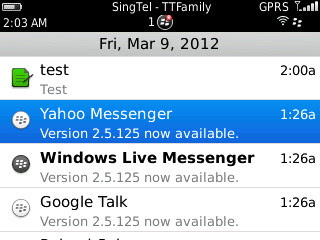
- Yahoo! Messenger
- Google Talk
- Windows Live Messenger
Go to link download
Official OS 6 0 0 600 For The BlackBerry Bold 9800
Official OS 6 0 0 600 For The BlackBerry Bold 9800
Official OS 6.0.0.600 All Languages (191.3MB), Multilanguage (168.1MB), and Asia (160.91MB) for the BlackBerry Torch 9800 by AT&T.


Click here to download
Go to link download
Sunday, November 27, 2016
Official OS6 0 0 615 For The BlackBerry Bold 9700
Official OS6 0 0 615 For The BlackBerry Bold 9700
Official OS 6.0.0.615 All languages for your BlackBerry Bold 9700 (178.26MB) by WIND Mobile.

Click here to download
Go to link download
Wednesday, November 23, 2016
New Official BBM Updated v6 1 0 49
New Official BBM Updated v6 1 0 49

Share your pin or unique barcode to connect with friends anywhere, anytime. Take comfort in knowing your friends are only a BlackBerry® Messenger message away whether you want to make plans for the night or ask a quick question.
Chat and share funny stories, pictures, videos and more with individual contacts or groups of friends instantly. Even share app experiences with BBM-connected apps – so that the things you love to do on your BlackBerry smartphone can now be shared.
Stay in touch like never before with BlackBerry® Messenger.
New on the latest version of BBM:
- Support for Animated Avatars – display pictures can now be animated!
- Enjoy a new selection of Emoticons
- Double the space to update your Personal Messages
- Customize the colour of chat bubbles for your contacts
- Simpler display picture update from the camera app – snap a picture and display it on BBM right away
Beberapa fiturs baru dan perubahan pada BBM v6.1 :
- Display Picture / DP BBM animasi bisa gerak2 tanpa perlu view DP dulu.
- Tambahan beberapa icon smiley baru.
- Personal Message sekarang bisa sampai 160 karakter, lebih panjang dari twitter. Bisa buat curhat. =))
- Bisa ubah warna bubble chat. Ada banyak warna warni.
- Bisa langsung update DP BBM dari pic di galeri/kamera. Langsung capture dari kamera BB anda dan jadikan display picture.
- Tersedia Tambahan avatar animasi gif tersedia di folder avatar (picture folder) untuk anda pakai sebagai DP
Yang perlu diperhatikan. Teman anda harus punya BBM v6.1 tersebut untuk bisa melihat fitur tersebut dan anda juga harus punya BBM v6.1 untuk menikmati fitur tersebut.
Download New BBM
Sementara ini, BBM di BlackBerry appworld masih belum terupdate, silakan coba refresh appworld atau Download ota via website resmi BlackBerry di:Download Now For Blackberry OTA
Go to link download
Tuesday, November 22, 2016
Official OS6 0 0 526 For The BlackBerry Curve 3G 9300
Official OS6 0 0 526 For The BlackBerry Curve 3G 9300
Download the latest official OS for the BlackBerry Curve 3G 9300 by Orange Spain. OS6.0.0.526 (All Languages - 180.57MB):
9300jAllLang_PBr6.0.0_rel2342_PL6.6.0.195_A6.0.0.526_Orange_Spain.exe.

Click here to download
Go to link download
Friday, November 18, 2016
Official OS6 0 0 534 For The BlackBerry Curve 3G 9300
Official OS6 0 0 534 For The BlackBerry Curve 3G 9300

Official OS 6.0.0.534 All Languages (175.78MB)...for your BlackBerry Curve 3G 9300 by Virgin Mobile Canada.

Click here to download
Go to link download
Monday, November 14, 2016
Official Storm 5 0 0 425 is available for download
Official Storm 5 0 0 425 is available for download
Get the new official Storm OS version 5.0.0.425 here http://na.blackberry.com/eng/support/downloads/download_sites.jsp and choose Vodafone Australia as currently only available in Australia :)
Im currently upgrading my Storm, Ill be back with report how it goes and whats new in this version.
Go to link download
Wednesday, November 9, 2016
Official OS6 0 0 534 For The BlackBerry Bold 9780
Official OS6 0 0 534 For The BlackBerry Bold 9780

Official OS 6.0.0.534 Multilanguage (172.91MB)...for your BlackBerry Bold 9780 by MTS Mobility.

Click here to download
Go to link download
Wednesday, November 2, 2016
Official OS6 0 0 576 For The BlackBerry Curve 3G 9300
Official OS6 0 0 576 For The BlackBerry Curve 3G 9300
Official OS 6.0.0.576 Multilanguage (158.51MB) for your BlackBerry Curve 3G 9300 by AVEA Turkey.

Click here to download
Go to link download
Wednesday, October 26, 2016
Nokia Asha 501 official
Nokia Asha 501 official
Nokia asha 501 is official, it will be available in india by June. The nokia asha 501 is the phone of the touch series of asha by nokia. The phone is cheap and will be the first phone of the touch series. The nokia asha 501 features a 3 inch LCD capacitive touch screen (320*240 pixels). The phone will not have 3G capabilities and will be available in single and dual-sim variants.

Nokia will include a 4GB memory card with the phone and you can expand it to 32GB. The phone will regular nokia apps like nokia apps store from where you can download applications to modify your phone. The phone will come in 6 colours and you might get the accessories with the phone of the same colour.
Go to link download
Monday, October 24, 2016
Official OS6 0 0 546 For The BlackBerry Torch 9800
Official OS6 0 0 546 For The BlackBerry Torch 9800
Official OS 6.0.0.546 All Languages (199MB)...for your BlackBerry Torch 9800 by Vodafone.

Click here to download
Go to link download
Subscribe to:
Posts (Atom)